LOG <string>, <expression>
LOG “Activity Time”, Attr1
Downtime logic, operation logic, node entry and exit logic, arrival, shift and break logic and routing exit logic.
<string>
This string will be stored in the file before the result of the log expression and may not be a string expression. Use this string to identify the number that follows.
<expression>
The result of this expression subtracted from the model’s current time will be stored in the file <model name>.LAP, after the string above.
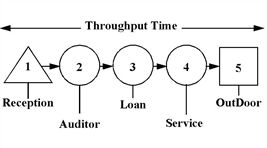
The example below shows a LOG statement used to capture each Client’s total throughput time as they travel through the system. Time starts when the Client arrives at Receptionist and stops when the Client exits through the door. The first process sets attribute CT equal to the current clock time. Next, Clients are sent randomly to one of three offices. Finally, when a Client leaves the system at location OutDoor, the LOG statement records the cycle time by subtracting the time stored in attribute CT from the current simulation time.
Process Table
|
Entity... |
Location... |
Operation (min)... |
|
Client |
Reception |
CT=CLOCK() |
|
Client |
Auditor |
WAIT T(5,6,8) |
|
Client |
Loan |
WAIT T(4.5,5,7) |
|
Client |
Service |
WAIT N(6.2,1.1) |
|
Client |
OutDoor |
LOG “Cycle Time”, CT |
Routing Table
|
Blk |
Output... |
Destination... |
Rule... |
Move Logic... |
|
1 |
Client |
Auditor Loan Service |
RANDOM 1 RANDOM RANDOM |
MOVE FOR 1.5 |
|
1 |
Client |
OutDoor |
FIRST 1 |
MOVE FOR 0.5 |
|
1 |
Client |
OutDoor |
FIRST 1 |
MOVE FOR 0.5 |
|
1 |
Client |
OutDoor |
FIRST 1 |
MOVE FOR 1.2 |
|
1 |
Client |
EXIT |
|
|
See Also
WRITE, WRITELINE, and READ. Also see External Files.

|
© 2012 ProModel Corporation • 556 East Technology Avenue • Orem, UT 84097 • Support: 888-776-6633 • www.promodel.com |